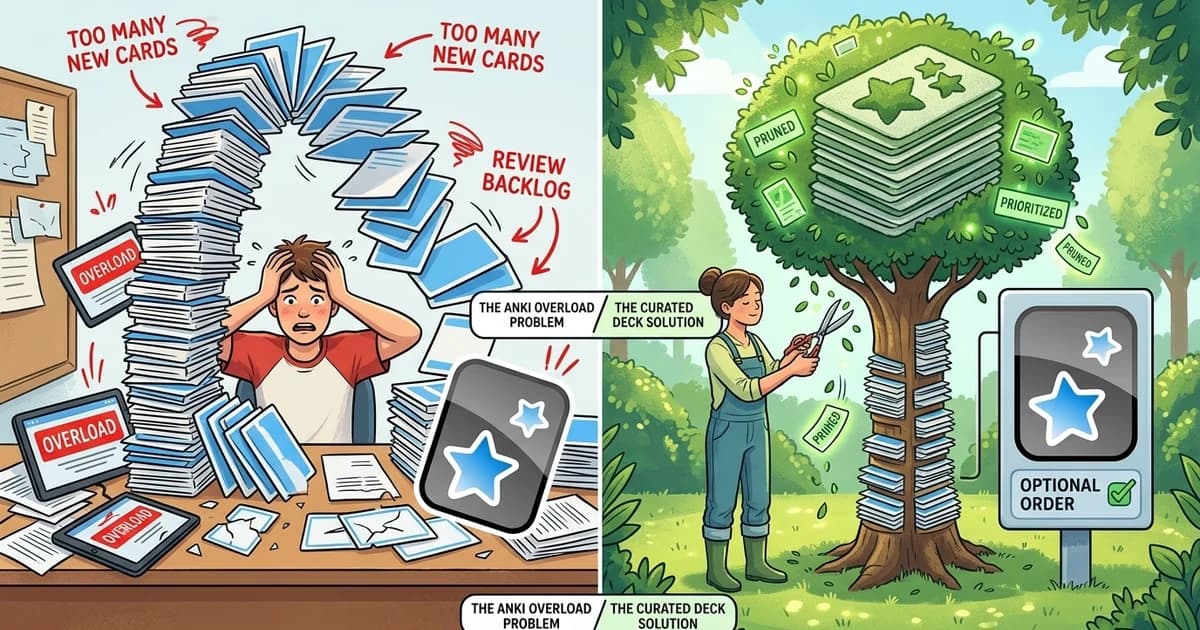
It starts innocently: 10 new cards a day. Then 20. Then you start adding words from every video, every article, every conversation. Six months later you open Anki and it's waiting for you like a wall: 437 reviews due today, and your entire evening evaporates into a gray slog of flashcards you barely remember adding.
This is Anki overload—the single most common reason learners abandon spaced repetition. The irony is that Anki itself isn't the problem; the inputs are. In this guide, you'll learn the mechanics of why reviews pile up, how to fix an overloaded deck without losing your study history, and how to calibrate your system so it never collapses again.
The Mechanics of Anki Overload: Why Reviews Pile Up
Anki's scheduler is a debt engine: every card you add today generates future review obligations. The trap is that obligations compound while motivation doesn't:
-
Too many new cards per day: At 20 new cards/day with retention targets, your mature review load settles around 100-200 cards/day—every day, forever, including the days you just want to rest.
-
Unfiltered mining: Adding every unknown word (the hoarding trap) fills your deck with low-frequency words that provide almost no comprehension value.
-
Ease Hell: When you press "Again" on a card too often, Anki lowers its ease multiplier and the card starts appearing daily—creating a spiral of repetition that burns you out on specific words.
-
No pruning discipline: Decks grow unbounded because deleting cards feels like failure. But keeping dead weight is worse: it taxes every single future review session.
The result is a review queue that grows faster than your discipline, until the queue itself becomes the reason you quit.
Step 1: The Emergency Reset (Fix the Pile-Up Now)
If your queue is already unmanageable, don't try to catch up—catch down. Here's the emergency procedure:
-
Set new card limit to 0 (Deck Options → New cards/day → 0). The flood stops today.
-
Cap daily reviews to something you'll actually do—10, 20, 30 minutes max. Use the "Daily Limit" setting and stick to it religiously for two weeks.
-
Change "new card order" to ascending position so the remaining new cards surface oldest-first, and don't feel obligated to clear them all.
-
Suspend, don't delete: Anything you can't recall at all (learning cards that never matured) can be suspended without losing the card or its history.
-
Export a backup first (File → Export → your deck with scheduling). You can always restore if you over-prune.
The goal of the reset is not to clear the queue—it's to rebuild the habit. A 20-minute daily session you keep for a year beats a 2-hour session you abandon in a month.

Learn Languages with YouTube
Watch videos in your target language, auto-capture words into flashcards, and track your progress — all in one place.
Start Free →Step 2: Prune Like a Professional (The Frequency Filter)
The single highest-leverage action against overload is pruning based on word frequency. High-frequency words (the top 1,000-5,000 of a language) unlock most of the comprehension in real content. Low-frequency words cost you the same review time for a fraction of the benefit.
Professional language learners apply three rules:
-
Keep what you need: Words you've encountered more than once in real content, words from your active vocabulary goals, and core-frequency words.
-
Let go of what you don't: Rare words from a historical drama you'll never watch again? Suspend them. You can revisit them if they reappear.
-
Stop the bleed at the source: Only add new cards that pass a frequency check (top 5K) or that you've encountered repeatedly in your own immersion.
This is why curated decks exist: a good core deck of the 1,000 most frequent words of your target language gives you the biggest comprehension bang per review minute—and it never floods your queue with yesterday's impulse adds.
Step 3: Calibrate Your SRS for Sustainability
Once the queue is under control, set parameters that make overload structurally impossible:
| Setting | Sustainable Value | Why |
|---|---|---|
| New cards/day | 5-10 | Keeps mature review load in the 50-100/day band |
| Daily review limit | Whatever fits in 20-30 min | Protects rest days and motivation |
| Starting ease | 250% | Gives failing cards room to fall without spiraling |
| FSRS (if enabled) | Target retention ~90% | Automatic scheduling that adapts to your memory |
| Mature card interval | 21+ days | Long intervals are the point of SRS |
One habit change matters more than any parameter: never add cards during weak moments. Add in dedicated study sessions, not at 1 AM after watching a movie, or tomorrow's queue pays for tonight's enthusiasm.
Step 4: Let the Tool Do the Pruning For You
The best defense against overload is a system that never lets it build: spaced repetition that starts from a curated core deck (so you're not hand-picking every card), captures vocabulary with context (so every card is worth remembering), and adds cards by frequency instead of by impulse.
That's the design behind Metheus Learn: pre-built core decks of the most frequent 1,000 words per language, one-click card capture from your own immersion, and a clean SRS that syncs across devices—no desktop app to maintain, no local files to corrupt, no queue you can't control.
Your SRS Is a Diet, Not a Sprint
Anki overload is a signal, not a verdict: your system needs fewer inputs and more discipline. Reset the queue, prune by frequency, calibrate the limits, and treat daily reviews like a meal you never skip—small, consistent, and sustainable. The learners who win with SRS aren't the ones with the biggest decks; they're the ones who still open the app in month 18.
Start Free with Metheus and get a curated 1,000-word core deck, contextual one-click cards, and sustainable SRS that fits your life—not the other way around.
FAQ
How many Anki reviews per day is normal?
For a sustainable setup, a mature review load of 50-100 cards per day is typical (about 20-30 minutes). If you're regularly above 150-200, your new-card rate is too high or your deck needs pruning.
Is it bad to delete Anki cards from my deck?
No—pruning is a healthy and professional practice. Prefer suspending over deleting when you want to keep the card or its history, and always export a backup before large pruning sessions.
What is Anki Ease Hell and how do I fix it?
Ease Hell is when failing a card repeatedly lowers its ease multiplier, making it appear almost daily. Fixes include raising starting ease to 250%, using FSRS with a ~90% retention target, and burying or re-learning cards you consistently fail instead of chaining failures.
Language learning in 2026 isn't about finishing daily streaks. The fastest path to fluency combines three elements: comprehensible input from real media you enjoy, active vocabulary capture while consuming that content, and spaced repetition to lock words into long-term memory. Gamified apps build the habit. Immersion tools build the fluency. The most effective learners use both—in that order.
Start with Metheus
Watch videos in your target language, auto-capture words into flashcards, and track your progress — all in one place.
Get Started Free →